You see no cancel button on chatgpt.com
That usually means Apple or Google owns the subscription. Open your receipt. If it says Apple, cancel in iPhone Settings. If it says Google Play, cancel in Play Store subscriptions.

Cancel ChatGPT guide
Not sure if you can still get a refund? Try the free ChatGPT Refund Checker — 3 questions, exact steps for your platform.
Most people do not have a “how do I cancel?” problem. They have a “why is there no cancel button here?” problem. The answer is usually hidden in the receipt: OpenAI web billing, Apple Subscriptions, Google Play, or a Business workspace. This guide starts there, then shows what to check before the next renewal hits.
Quick answer
If you are staring at ChatGPT settings and cannot find the button, you are probably in the wrong billing system. Use the receipt, not memory. The card statement tells you who owns the cancellation path.
| Where you subscribed | How to cancel | Who handles refunds |
|---|---|---|
| Web (chatgpt.com) | Profile menu → Settings → Billing → Cancel plan → confirm. | OpenAI (see refund page). |
| iPhone / iPad (App Store) | iPhone Settings → your name → Subscriptions → ChatGPT → Cancel Subscription. | Apple handles cancel & refunds. |
| Android (Google Play) | Play Store → profile → Payments & subscriptions → Subscriptions → ChatGPT → Cancel. | Request through OpenAI Help while logged into the charged account. |
| ChatGPT Business workspace | Profile → Workspace settings → Billing → Manage plan → Cancel subscription. | OpenAI / workspace billing policy. |
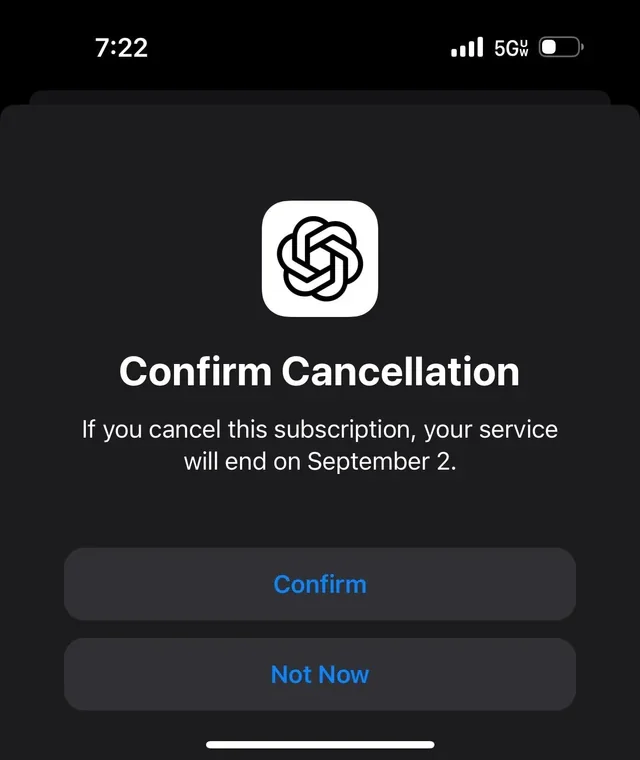
Verified against OpenAI Help on August 7, 2026. Cancel at least 24 hours before renewal. OpenAI says cancellation takes effect after the next billing date and subscription fees are non-refundable by default. Official source: OpenAI Help — cancel ChatGPT.
Real situations
These are the cases people actually arrive with. Pick the one that sounds like your charge.
That usually means Apple or Google owns the subscription. Open your receipt. If it says Apple, cancel in iPhone Settings. If it says Google Play, cancel in Play Store subscriptions.
Most likely you cancelled too late, cancelled in the wrong place, or only deleted the app. Check whether the subscription says “expires” instead of “renews.” If it still says renews, it is not cancelled.
Members cannot usually stop the whole workspace bill. A workspace owner has to open Workspace settings, Billing, Manage plan, then cancel or reduce seats.
Cancellation stops the next renewal. It does not automatically refund the current one. Web and Google Play refund requests go through OpenAI Help; Apple refunds go through Apple.
Step by step
The web flow is the most common. If you don't see a cancel button on the web, you subscribed through Apple or Google — use those steps instead.
Web, Apple App Store, or Google Play. The receipt or the "Manage subscription" link tells you which. You must cancel in that same place.
Web: chatgpt.com → profile → Settings → Billing. iPhone: Settings → your name → Subscriptions. Android: Play Store → Subscriptions.
Choose Cancel plan / Cancel Subscription and confirm. You should see a date showing access continues until the end of the period.
Check that the subscription shows "expires on" rather than "renews on." Cancel at least 24 hours before renewal so you are not charged again.
Platform guides: cancel on web · cancel on iPhone · cancel on Android · cancel Pro · cancel Business/Team
Before you cancel
| Question | What usually happens |
|---|---|
| Do I get a refund? | By default no prorated refund — you keep access to the end of the billing period. Accidental web or Google Play charges may be refundable if you contact OpenAI within 14 days. EU/UK/Turkey residents may have a prorated 14-day right; Korea has its own 7-day/full or prorated rules. See the refund guide. |
| Do I lose my chats? | No. Chat history and custom GPTs are kept; you drop to the free tier and can resubscribe later. |
| Does uninstalling cancel it? | No. Deleting the app does not stop Apple or Google Play billing. You must cancel in the store. |
| Can I cancel anytime? | Yes, month-to-month or annual plans can be cancelled anytime; cancel 24h before renewal to avoid the next charge. |
Does cancelling make sense?
Don't cancel on impulse. Pick the option that matches why you're leaving.
Downgrade to the free tier instead of cancelling your account. You keep history and can upgrade again anytime. See free vs Plus.
The problem may be caps, not value. Read ChatGPT limits before paying more — or use a multi-model tool to spread usage.
Instead of one $20 plan, MultipleChat gives ChatGPT, Claude and Gemini in one place. Compare before cancelling.
Claude, Gemini, Perplexity or Copilot may fit better. See alternatives after cancelling.
Cancelling pauses billing while keeping your data — there's no separate "pause," so cancel and resubscribe later. See pause vs cancel.
Business/legacy Team and the Pro plan cancel differently from Plus. See cancel Business/Team and cancel Pro.
Smarter than cancelling
Many people cancel ChatGPT because one plan feels expensive for one model. A multi-model workspace is often the better move: keep ChatGPT-style answers and add others, in one place.
Use ChatGPT, Claude, Gemini and other models in one subscription — compare answers and stop paying for several tools.
WritingOften stronger for careful writing and long documents; has a useful free tier.
GoogleGood for Google Workspace users, with a free tier.
ResearchBest for cited, source-backed answers and research.
All guides
FAQ
Short answers about cancelling ChatGPT Plus, refunds, what happens after, and alternatives.
Cancel where you subscribed. Web: chatgpt.com → profile → Settings → Billing → Cancel plan. iPhone (if you subscribed in the app): iPhone Settings → your name → Subscriptions → ChatGPT → Cancel. Android: Google Play → Subscriptions → ChatGPT → Cancel. Cancel at least 24 hours before renewal.
By default OpenAI does not give prorated refunds; you keep access until the end of the billing period. Accidental charges may be refundable if you contact support within 14 days, and users in the EU, UK and Turkey may have a 14-day prorated refund path, and Korea has separate rules. Verify on OpenAI's help center.
You keep Plus features until the current billing period ends, then drop to the free tier. Your chat history and custom GPTs are preserved in case you resubscribe.
No. Uninstalling the app does not cancel an Apple or Google Play subscription. You must cancel through Apple, Google Play or the web, depending on where you subscribed.
If you subscribed through the iOS or Android app, the web cancel option may not appear because Apple or Google manages the billing. Cancel through that store instead.
If you rarely hit limits, the free tier may be enough, so cancelling Plus and using free is reasonable. If you mainly want more value, compare alternatives or an all-in-one tool like MultipleChat before cancelling.
Claude, Gemini, Perplexity and Microsoft Copilot are strong alternatives, and the free ChatGPT tier still works. MultipleChat lets you use ChatGPT, Claude and Gemini in one subscription instead of paying for several.
Yes. ChatGPT subscriptions are month-to-month (or annual) and can be cancelled anytime; cancel at least 24 hours before renewal to avoid the next charge, and you keep access until the period ends.
You should not be charged for the next period if you cancel at least 24 hours before the renewal date and the subscription shows "expires on" instead of "renews on." If a charge still goes through, you likely cancelled in the wrong place or too late — check where you originally subscribed and verify the status on OpenAI's help center.
Open the same billing settings where you cancelled and confirm the plan now shows an expiry date rather than a renewal date — on Apple it reads "Expires," on Google Play it shows the cancellation, and on the web Billing shows the plan ending. If you only see a "Resubscribe" option, it is already cancelled. Verify on OpenAI's help center if unsure.
No. Cancelling drops you to the free tier but your chat history and custom GPTs are preserved on your account, so they should still be there if you resubscribe later. Some Plus-only features may be limited on the free tier. Verify current behavior on OpenAI's help center.
Cancelling stops the paid subscription but keeps your account, history and free-tier access. Deleting the account removes the account itself and its data. To simply stop paying, cancel the plan in billing — do not delete the account. Verify the current account-deletion process on OpenAI's help center.
You can usually resubscribe anytime, but the price you pay is whatever OpenAI charges at that time — prices can change, and a promotional rate may not return. Plus is around $20/month and Pro around $200/month as of mid-2026; confirm current pricing on OpenAI's pricing page before resubscribing.
Pro cancels the same way as Plus, in the place you subscribed (web, Apple or Google). Business/legacy Team is different: only a workspace owner or billing admin can cancel it, and it's done in Workspace settings, Billing, Manage plan on the web. See our cancel Pro and cancel Business/Team guides, and verify on OpenAI's help center.