Start with the receipt
Search your email for "OpenAI", "Apple" or "Google Play". That receipt matters more than memory. If you cancel in the wrong billing system, the real subscription keeps renewing.

Cancel ChatGPT Plus
Most failed ChatGPT cancellations have the same boring cause: the person cancels where they think the subscription lives, not where the receipt says it lives. If your card says OpenAI, cancel on the web. If your receipt says Apple, cancel in iPhone Settings. If it says Google Play, cancel in Google Play. Do that at least 24 hours before renewal, then check that the plan shows an expiry date.
Quick answer
OpenAI bills through three different systems. Match the one you used to sign up — if you cancel in the wrong place you will still be charged.
| Where you subscribed | How to cancel | Who handles refunds |
|---|---|---|
| Web (chatgpt.com) | Profile menu → Settings → Billing → Cancel plan → confirm. | OpenAI (see refund page). |
| iPhone / iPad (App Store) | iPhone Settings → your name → Subscriptions → ChatGPT → Cancel Subscription. | Apple handles cancel & refunds. |
| Android (Google Play) | Play Store → profile → Payments & subscriptions → Subscriptions → ChatGPT → Cancel. | Refund requests go through OpenAI Help while logged into the charged account. |
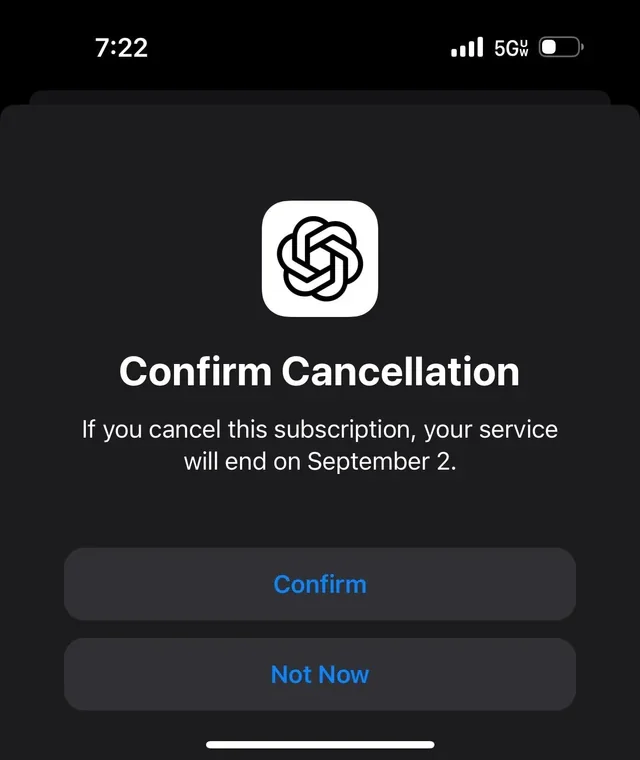
Tip: cancel at least 24 hours before your renewal date. You keep access until the current period ends, then drop to the free tier. Official source: OpenAI Help — cancel ChatGPT Plus.
Step by step
Follow the path that matches how you subscribed. If you don't see a cancel button on the web, you almost certainly subscribed through Apple or Google.
Search your email for "OpenAI", "Apple" or "Google Play". That receipt matters more than memory. If you cancel in the wrong billing system, the real subscription keeps renewing.
Sign in at chatgpt.com, open your profile menu, go to Settings → Billing, choose Cancel plan and confirm. Older accounts may see Settings → Subscription → Manage → Cancel.
If you subscribed in the iOS app: iPhone Settings → tap your name → Subscriptions → ChatGPT → Cancel Subscription. Apple manages cancellation and refunds.
If you subscribed in the Android app: Play Store → profile → Payments & subscriptions → Subscriptions → ChatGPT → Cancel subscription. For a refund, OpenAI says to use OpenAI Help while logged into the charged account.
Cancel at least 24 hours before the next billing date so you are not charged again. You keep access until the end of the current period.
Check the subscription shows "expires on" rather than "renews on." Chat history and custom GPTs are preserved in case you resubscribe.
Platform guides: cancel on web · cancel on iPhone · cancel on Android
What happens after
| Question | What usually happens |
|---|---|
| Do I keep access right away? | You keep Plus features until the end of the current billing period, then drop to the free tier automatically. |
| Do I lose my chats? | No. Chat history and custom GPTs are kept; you can resubscribe later and pick up where you left off. |
| Do I get a refund? | By default no prorated refund. Accidental web or Google Play charges may be refundable through OpenAI Help, Apple refunds go through Apple, EU/UK/Turkey users may have a 14-day prorated path, and Korea has separate rules. See the refund guide. |
| Does uninstalling cancel it? | No. Deleting the app does not stop Apple or Google Play billing. You must cancel in the store. |
Refunds depend on where you subscribed: OpenAI Help for web and Google Play charges, Apple for App Store charges. Full detail on the ChatGPT refund page.
Common failures
The official steps are short. The messy part is figuring out why the button you need is missing or why a charge still appeared.
That usually means OpenAI is not the billing owner. Check Apple Subscriptions and Google Play Subscriptions before assuming the web page is broken.
OpenAI says to cancel at least 24 hours before the next billing date. If the renewal already processed, cancellation stops the next one; it does not automatically reverse this one.
Deleting ChatGPT from your phone only removes the app. Apple or Google Play billing keeps running until the subscription itself is cancelled.
If you have work, personal and old Google-login accounts, check each one. The charged account is the one that matters for OpenAI Help and billing status.
Before you cancel
Don't cancel on impulse. Pick the path that matches why you're leaving.
Cancelling drops you to the free tier, which keeps your history. If you only want to pause spending, that's the simplest move.
Instead of one $20 plan, MultipleChat lets you keep AI access for less by using ChatGPT, Claude and Gemini in one subscription.
Claude, Gemini, Perplexity or Copilot may fit better. See alternatives after cancelling.
Smarter than cancelling
Many people cancel ChatGPT Plus because one plan feels expensive for one model. A multi-model workspace is often the better move: keep ChatGPT-style answers and add others in one place.
Use ChatGPT, Claude, Gemini and other models in one subscription — keep AI access for less and stop paying for several tools.
WritingOften stronger for careful writing and long documents; has a useful free tier.
GoogleGood for Google Workspace users, with a free tier.
ResearchBest for cited, source-backed answers and research.
Official links
Related guides
FAQ
Short answers about cancelling ChatGPT Plus across web, iPhone and Android.
Cancel where you subscribed. Web: chatgpt.com → profile → Settings → Billing → Cancel plan. iPhone (if you subscribed in the app): iPhone Settings → your name → Subscriptions → ChatGPT → Cancel. Android: Google Play → Subscriptions → ChatGPT → Cancel. Cancel at least 24 hours before renewal.
Check your receipt or the Manage subscription link. A receipt from Apple means cancel in iPhone Settings, a receipt from Google means cancel in Google Play, and a receipt from OpenAI means cancel on the web. Cancelling in the wrong place will still bill you.
You keep Plus features until the current billing period ends, then drop to the free tier. Your chat history and custom GPTs are preserved in case you resubscribe.
By default OpenAI does not give prorated refunds; you keep access until the end of the billing period. Accidental web or Google Play charges may be refundable through OpenAI Help. Apple refunds go through Apple. EU, UK and Turkey users may have a 14-day prorated refund path, and Korea has separate rules. Verify on OpenAI's help center.
No. Deleting the app does not cancel an Apple or Google Play subscription. You must cancel through Apple, Google Play or the web, depending on where you subscribed.
Yes. ChatGPT subscriptions are month-to-month or annual and can be cancelled anytime; cancel at least 24 hours before renewal to avoid the next charge, and you keep access until the period ends.
Check the same place you cancelled: the subscription should show "expires on" rather than "renews on." On Apple it reads "Expires," on Google Play it shows as cancelled, and on the web Billing shows the plan ending. If you only see "Resubscribe," it is already cancelled. Verify on OpenAI's help center if you're unsure.
By default OpenAI does not give a prorated refund for the unused part of an annual term; you typically keep access until the term ends. Accidental charges may be refundable within about 14 days, and EU, UK and Turkey users may have a 14-day prorated refund path, and Korea has separate rules. Verify on OpenAI's help center, or Apple if billed through the App Store.
If you have a trial, cancel before it ends to avoid being charged — generally at least 24 hours before the trial converts to a paid period. Cancel in the same place you started the trial (web, Apple or Google). Trial availability and terms vary, so verify the current details on OpenAI's help center.
There is no automatic transfer. You generally cancel the Apple subscription in iPhone Settings, let it lapse at the period end, then subscribe again directly on chatgpt.com so OpenAI bills you. Avoid double-paying by not subscribing on the web until the Apple plan has ended. Verify the current steps on OpenAI's help center.
You should not be charged for the next period if you cancel at least 24 hours before the renewal date and the subscription shows "expires on" instead of "renews on." If a charge still goes through, you likely cancelled too late or in the wrong place — check where you originally subscribed and verify the status on OpenAI's help center, or with Apple for App Store billing or OpenAI Help for Google Play billing.