Open iPhone Settings
Tap the Settings app on your home screen. This is where Apple stores every App Store subscription tied to your Apple Account.

Cancel on iPhone
Not sure if you can still get a refund? Try the free ChatGPT Refund Checker — 3 questions, exact steps for your platform.
If you subscribed to ChatGPT Plus inside the iOS app, Apple — not OpenAI — handles your billing. That means you cancel through your iPhone's Settings, not on chatgpt.com. This guide shows the exact Settings path, explains why the web cancel button won't appear, and covers Apple refunds and what happens to your data after you cancel.
Quick answer
An iPhone subscription is an Apple subscription. Cancel it where Apple keeps it — in your device Settings — not on the web. Cancelling in the wrong place still bills you.
| Step | Where to tap |
|---|---|
| Open Settings | The Settings app on your iPhone or iPad home screen. |
| Tap your name | Your Apple Account banner at the top of Settings. |
| Subscriptions | Tap Subscriptions to list all App Store subscriptions. |
| ChatGPT → Cancel | Tap ChatGPT, then Cancel Subscription, and confirm. |
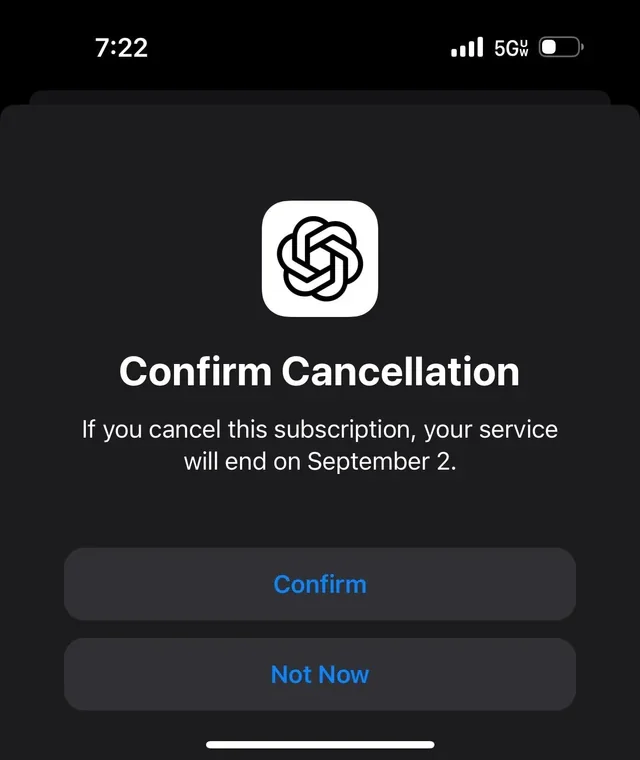
Official source: OpenAI Help — cancel your Apple subscription for ChatGPT Plus.
Step by step
These steps assume you subscribed through the App Store. If you don't see ChatGPT in your Subscriptions list, you likely subscribed on the web or on Android instead.
Tap the Settings app on your home screen. This is where Apple stores every App Store subscription tied to your Apple Account.
At the very top of Settings, tap your name (your Apple Account banner) to open account-level options.
Tap Subscriptions. You'll see a list of active and expired subscriptions billed through Apple.
Tap ChatGPT to open its detail screen, showing the plan and renewal date.
Tap Cancel Subscription and confirm. If you only see "Resubscribe," it is already cancelled.
Cancel at least 24 hours before the renewal date. You keep Plus until the period ends, then drop to the free tier.
Subscribed elsewhere? See cancel on web · cancel on Android · all methods
Apple specifics
| Question | What usually happens |
|---|---|
| Can I cancel on chatgpt.com? | Usually no. If Apple billed you, the web cancel option often won't appear because Apple manages the subscription. Cancel in iPhone Settings instead. |
| Who handles my refund? | Apple. Request refunds at reportaproblem.apple.com. OpenAI cannot refund an Apple-billed plan. See the refund guide. |
| Does deleting the app cancel it? | No. Uninstalling the app does not cancel an Apple subscription — you must cancel in Settings. |
| Do I lose my chats? | No. Chat history and custom GPTs are kept; you drop to the free tier and can resubscribe later. |
Smarter than cancelling
If you're leaving Plus because one plan feels expensive, a multi-model workspace can be the better move — keep ChatGPT-style answers and add others in one place.
Use ChatGPT, Claude, Gemini and other models in one subscription — keep AI access for less instead of paying for several tools.
WritingOften stronger for careful writing and long documents; has a useful free tier.
GoogleGood for Google Workspace users, with a free tier.
ResearchBest for cited, source-backed answers and research.
Official links
Related guides
FAQ
Short answers about cancelling an Apple App Store ChatGPT subscription.
If you subscribed in the iOS app, open iPhone Settings → tap your name → Subscriptions → ChatGPT → Cancel Subscription. Cancel at least 24 hours before the renewal date.
If you bought ChatGPT Plus inside the iOS app, Apple manages the billing, so chatgpt.com may not show a cancel option. You must cancel through iPhone Settings or the App Store instead.
Yes. For subscriptions bought in the iOS app, Apple handles cancellation and refunds. Request a refund through reportaproblem.apple.com. OpenAI cannot refund an Apple-billed subscription. Verify on OpenAI's and Apple's help pages.
No. Uninstalling the app does not cancel an Apple subscription. You must cancel in iPhone Settings under Subscriptions, otherwise Apple keeps billing you.
You keep ChatGPT Plus until the end of the current billing period, then drop to the free tier. Your chat history and custom GPTs are preserved.
Yes. You can cancel anytime in Settings, but cancel at least 24 hours before the renewal date to avoid the next charge. You keep access until the current period ends.
Yes. An Apple subscription is tied to your Apple Account, not a single device, so you can cancel from iPhone or iPad. Open Settings → tap your name → Subscriptions → ChatGPT → Cancel Subscription on either device. The change applies to the whole Apple Account.
There's no automatic transfer. Generally you cancel the Apple subscription in iPhone Settings, let it lapse at the period end, then subscribe again on chatgpt.com so OpenAI bills you. To avoid paying twice, wait until the Apple plan has ended before subscribing on the web. Verify current steps on OpenAI's help center.
Apple. Because Apple processed the in-app payment, refunds for an iOS ChatGPT subscription are requested from Apple at reportaproblem.apple.com, not from OpenAI. OpenAI cannot refund an Apple-billed charge. Refunds are decided by Apple case by case; verify on Apple's and OpenAI's help pages.
No. Cancelling an Apple subscription drops you to the free tier at the period end, but your chat history and custom GPTs stay on your ChatGPT account regardless of how you were billed. Some Plus-only features may be limited on the free tier. Verify current behavior on OpenAI's help center.